
Most service desks report on speed and volume. Yet the same tickets also record where systems fail again and again. This guide shows how ITSM analytics links incident data to applications, dependencies, and changes, so you can spot technical debt early and turn it into a ranked remediation plan.
Introduction: Your Architecture Is Telling You Where It Hurts
Every ticket tells a small story. A user can’t log in. A payment job stalls. Reports take too long to load. On its own, each one looks like a routine fix. Taken together, however, these stories form a record of where your systems strain under real use. ITSM analytics is how you read that record.
That is the promise of service desk intelligence done well. Most teams use service desk data to track workload and service levels. Few use it to ask a harder question: which parts of the architecture keep failing, and why?
Infrastructure dashboards answer a different question. They show CPU load, memory, latency, and uptime right now. In other words, they watch health in the moment. Architecture intelligence, by contrast, looks for patterns across months. It asks which services break after changes, which teams keep inheriting the same fault, and which workarounds have quietly become permanent.
This gap matters because technical debt rarely shows up as one big outage. Instead, it builds up as daily friction. As a result, it hides inside closed tickets that no one reads twice.
Why Standard Reporting Falls Short of Real ITSM Analytics
Teams built standard ITSM reports to manage service delivery, not to judge system design. So most leaders review four familiar metrics:
- Ticket volume shows demand, but not why that demand exists.
- SLA adherence shows whether teams met targets, even when they met them by patching the same flaw again.
- MTTR shows how fast teams recover. Yet a fast fix for a repeat fault can still hide a deep design problem.
- Resolution rate shows closure. However, a closed ticket and a solved problem are not the same thing.
Each metric has value. Still, each one treats tickets as separate events. A team can hit every SLA while the same service fails every month. In fact, strong service metrics can mask weak architecture, because skilled support staff quietly absorb the cost.
The real issue, then, is not data quality. It is the question we ask the data to answer. Volume and speed tell you how well the desk runs. They say little about why the same work keeps coming back.
Consider an order service that fails in the same way every few weeks. Each ticket closes within SLA, so the dashboard stays green. Meanwhile, the team spends hours each month on the same fix, and the root cause never reaches the engineering backlog.
Five Signals of Hidden Technical Debt in Service Desk Data
Technical debt leaves fingerprints. When you know what to look for, five signals stand out.
- Recurring incidents
The same incident returns after each fix. For example, a batch job fails at every quarter-end, or a data sync breaks after every patch. Recurrence usually points to a design limit, not a one-off bug.
- Repeated escalations
Some tickets keep moving from L1 to L2 and then to engineering. When this happens again and again, the system has grown too complex for front-line teams to support. Therefore, the knowledge gap is often a design gap too.
- Persistent workarounds
Look for knowledge articles that say “restart the service” or “clear the cache and retry.” These notes keep users productive. However, they also show where a team chose speed over a lasting fix. Over time, the workaround becomes part of the system itself.
- Change-related failures
Incidents that spike after releases point to fragile code paths, thin test coverage, or hidden coupling. In short, if a small change in one service breaks another, your dependency map is wrong or missing.
- Recurring ownership gaps
Some tickets bounce between teams because no one owns the failing component. This signal is easy to miss. Yet orphaned services often carry the oldest code and the least documentation.
None of these signals proves debt on its own. Together, though, they show you where to look first.
Connecting Tickets to Applications, Dependencies, and Changes
Ticket data becomes intelligence only when you link it to the systems behind it. On its own, a ticket says what broke. Once linked, it can also say where, after what, and how far the damage spread.
Start with five data sources:
- CMDB records tie each ticket to a configuration item, such as an app, a server, or a database.
- Service maps show which business services depend on that item.
- Application dependency maps reveal upstream and downstream links, including shared libraries and APIs.
- CI/CD events show what changed, when it changed, and who deployed it.
- Infrastructure telemetry adds context, such as load or latency when the incident began.
The join itself is simple. First, match each ticket to a configuration item. Then, line up its timestamp with nearby deployments and alerts. Finally, trace the item’s dependencies to see whether the root fault sits somewhere else.
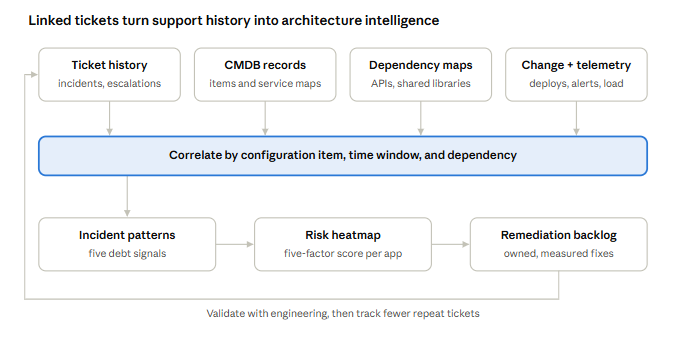
Choose time windows with care. A deployment two hours before an incident is a strong lead, while one from two weeks earlier is usually noise. Likewise, weight direct dependencies more than distant ones, so the analysis points engineers to the most likely cause.
This step also exposes gaps in your data. For instance, many tickets carry vague or wrong category tags. Similarly, the CMDB may lag behind the real environment. So treat cleanup as part of the work, rather than a reason to delay it.
Using ITSM Analytics to Build an Architecture Risk Heatmap
Once tickets link to applications, you can score each application for architectural risk. A heatmap then makes the result easy to read at a glance.
Use five factors, and score each one from 1 (low) to 5 (high):
| Factor | What it measures |
| Recurrence | How often the same issue returns |
| Severity | The business impact of each incident |
| Recovery effort | Hours, teams, and escalations needed to restore service |
| Dependency complexity | How many systems rely on or feed this one |
| Business criticality | How central the app is to revenue, customers, or compliance |
Add the scores, or weight them to fit your priorities. For example, a regulated lender might give criticality more weight. Next, plot each application against the five factors. Apps that score high on several factors at once deserve attention first.
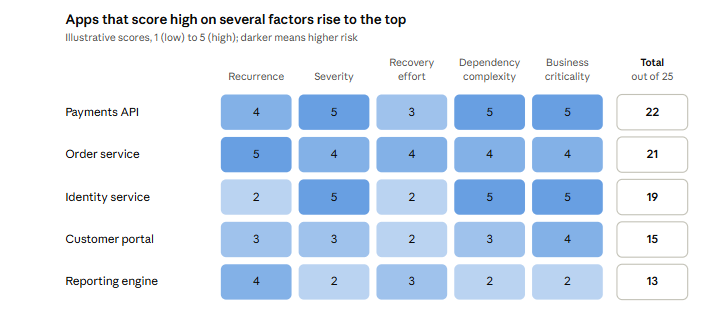
Keep the model simple at the start. A rough score that teams trust beats a precise one they ignore. Over time, you can refine the weights as you learn which scores predict real outages.
Share the heatmap with both support and engineering leads. Because it draws on tickets that both groups already know, it tends to start a practical conversation instead of a debate about whose data is right.
From Root-Cause Analysis to Engineering Action
A heatmap only helps if it changes what engineers build next. That means turning clusters into formal work.
First, convert each high-risk incident cluster into a problem record. Link every related ticket, so the full history sits in one place. Next, run root-cause analysis on the pattern, not just the latest event. After that, write up the finding as an engineering item with a clear owner, scope, and success measure.
These items belong in an architectural remediation backlog. Unlike feature work, this backlog targets debt: tight coupling, outdated components, missing tests, or fragile integrations. Product and engineering leaders should rank it alongside the feature roadmap, rather than behind it.
It also helps to set a review rhythm. A monthly session between problem managers and architects keeps the backlog current. Meanwhile, it gives support teams a clear path to raise new patterns as they appear.
Finally, measure the result. Track whether recurrence drops, whether escalations fall, and whether change failure rates improve for that application. When those numbers move, the case for the next round of remediation becomes much easier to make.
A Practical 30-Day ITSM Analytics Framework
You don’t need a large program to start. Instead, a focused 30-day pilot can prove the value quickly.
Week 1: Select critical applications. Pick three to five applications that matter to the business and generate steady ticket volume. Then agree on a review window, such as the last six to twelve months.
Week 2: Normalize ticket data. Clean up categories, merge duplicates, and map each ticket to a configuration item. Also, flag tickets that mention workarounds or repeat fixes.
Week 3: Identify patterns. Cluster tickets by symptom, component, and timing. Next, overlay change events and dependency data. Then score each application with the heatmap factors.
Week 4: Validate with engineering. Share the findings with the teams that own each application. Ask whether the patterns match what they see day to day. Their input will confirm some findings and rule out others. Either way, you end the month with a ranked, tested list of remediation candidates.
Keep the pilot small on purpose. A narrow scope makes findings easier to check and faster to act on. Once the method works for a few apps, you can extend it across the wider portfolio.
Conclusion: Stop Treating Tickets as Closed Conversations
A closed ticket ends one user’s problem. However, it should not end the conversation about why that problem happened.
Your service desk already holds years of evidence about how your systems behave under pressure. When you link that evidence to applications, dependencies, and changes, it becomes an architecture intelligence layer. As a result, modernization decisions can rest on how systems actually fail, rather than on assumptions.
The data is already there. The next step is to read it differently.
