
PromptOps for Engineering Leaders:
Why Your Prompts Need Version Control More Than Your Code Does
Two weeks. That’s how long it took a national mortgage lender’s engineering team to diagnose
why their document-classification accuracy had suddenly dropped 18%.
Two weeks. That’s how long it took a national mortgage lender’s engineering team to diagnose why their document-classification accuracy had suddenly dropped 18%.
They checked everything. Model version? Same. Training data? Unchanged. API endpoints? All green. Infrastructure? Rock solid. Every engineer on the team was convinced it had to be a deployment issue, a model drift problem, or corrupted data somewhere in the pipeline.
00
1. When a Single Sentence Cost Two Weeks and $340K
Finally, at 11 PM on a Friday, a junior engineer found it: a one-sentence prompt modification made three weeks earlier during what someone had labeled a “routine workflow optimization.”
One sentence. Changed without review. No version control. No testing. No rollback path.
The prompt had been live in production for 21 days, misclassifying thousands of mortgage documents, causing downstream delays in underwriting, and costing the company an estimated $340,000 in operational inefficiency and SLA breaches.
Here’s what keeps us up at night: this wasn’t an anomaly. We see this pattern constantly. As organizations scale their AI footprint, prompt fragility becomes one of the most expensive and least-visible operational risks in the entire stack.
The problem? Most engineering teams treat prompts like configuration files. But prompts don’t behave like config—they behave like code. They introduce regressions. They interact unpredictably with models. They drift as data shifts. And they break production in ways that are nearly impossible to debug without proper governance.
The engineering leaders who succeed in scaling AI don’t treat prompts as text strings. They treat them as first-class production artifacts with versioning, testing, approval workflows, SLAs, ownership, and full lifecycle management.
This is the discipline known as PromptOps. And if you’re deploying LLMs into production systems, you need it yesterday.
00
2. The PromptOps Maturity Model: Where Are You, Really?
Most organizations believe they’re “doing PromptOps” once they put prompts in a shared folder. In reality, that’s like saying you’re “doing DevOps” because your code is on GitHub.
Prompt operations maturity evolves across five distinct levels. Where you are determines whether your AI systems are reliable production assets or expensive time bombs.
Level 0: Ad-Hoc Prompts in Chat Interfaces
This is where most experimentation begins. Prompts live in:
ChatGPT history tabs
Individual engineers’ notebooks (that only they can find)
Slack threads (good luck searching for that later)
Browsers, local documents, and sticky notes
What this looks like in practice: Someone asks, “Hey, what prompt are we using for the customer sentiment classifier?” Five people give five different answers. Nobody’s sure which one is in production.
Risks:
Zero reproducibility (can’t recreate results even 10 minutes later)
High drift (everyone’s making their own modifications)
No audit trail (compliance nightmare)
Debugging production failures is pure guesswork
New team members take weeks to understand what prompts even exist
Reality check:If you’re here, you’re not ready for production AI. Period.
Level 1: Copy-Pasted Prompts in Code Comments
Developers start embedding prompts directly in code:
String literals in Python files
Comments at the top of functions
Notebook cells marked “PROMPT – DO NOT CHANGE”
Occasionally in README files
Benefits:
Slightly more consistency (at least it’s near the code)
Prompts live closer to the system logic
But here’s the problem: We worked with a SaaS company that had 47 copies of their “standard summarization prompt” across their codebase. Each one had diverged slightly. Engineers were copy-pasting, making small tweaks, and creating Frankenstein versions. When they needed to improve the prompt globally, they had to hunt down 47 variants. Three months later, they found two more they’d missed.
Remaining risks:
No versioning separate from code (prompt changes buried in git commits)
No prompt-level testing (only tested as side effects of code tests)
No ability to identify prompt regressions
Code reviewers rarely evaluate prompt quality (“it’s just text, ship it”)
Level 2: Centralized Prompt Registry
Someone finally says, “We need to get organized.” The team creates a shared location:
JSON/YAML prompt files in a /prompts directory
Internal wiki pages (“Master Prompt Library”)
Shared Google Docs (with Please Don’t Edit in the title)
Confluence pages (that nobody updates)
Benefits:
One source of truth (in theory)
Better reuse potential
Slightly easier auditing
The trap:
Registry ≠ governance. We’ve seen companies with beautiful prompt registries where every prompt has a version like “v2_final_FINAL_use_this_one_v3”. Or where the “latest” prompt in the registry doesn’t match what’s running in production because someone did a “temporary” override six months ago.
Remaining gaps:
No CI/CD (changes go straight to prod)
No reproducibility guarantees
No automated validation
persist
No protection against direct editing
Level 3: Version-Controlled, Reviewed, Tested Prompts
This is where engineering discipline finally enters the picture. The organization treats prompts similarly to feature code:
✓ Git-hosted prompt repositories
✓ Pull-request reviews for prompt changes
✓ Regression test suites
✓ Approval workflows based on risk
✓ Metadata schemas (owner, use case, SLA)
✓ Clear rollback procedures
What changes:
A fintech client reached Level 3 last year.
Before: prompt changes took 2 days and caused production issues 40% of the time.
After: prompt changes take 4 hours and cause production issues <5% of the time.
Why? Because now when someone wants to change a prompt: They create a branch
They update the regression tests
They submit a PR with before/after examples
A senior engineer reviews it
Automated tests run against golden datasets
If it passes, it deploys via standard CD pipeline
Benefits:
Repeatability (can recreate any past state)
Reduced incidents (caught in testing, not production)
Increased engineer confidence (people stop being afraid to touch prompts)
Clear ownership (every prompt has an owner)
This is where most mid-market companies start seeing real ROI—typically reducing prompt-related incidents by 25-40% within the first quarter.
Level 4: Prompt CI/CD with Drift Detection
This is true PromptOps maturity. Only about 15% of organizations we work with have reached this level, but the ones who have treat it as a competitive advantage.
Capabilities include:
Automated prompt linting (catches common mistakes before review)
Bias, toxicity, and hallucination checks (automated red flags)
Golden dataset regression tests (every PR proves no regressions)
Output diffing (semantic comparison of outputs, not just string matching)
Canary deployments (roll out prompt changes to 5% of traffic first)
Drift detection (alerts when model updates or data shifts affect outputs)
Auto-rollback (if quality drops below threshold, previous version restores automatically)
Real example:
An e-commerce platform at Level 4 pushed a prompt change to their product recommendation engine. The canary caught a 12% drop in click-through rate before it hit 95% of users. Auto-rollback triggered. Total impact: <2% of one day’s traffic. At Level 2, they would have shipped that globally and spent a week diagnosing it. At this stage, prompts have full lifecycle management—just like microservices. They’re deployed, monitored, scaled, and retired with the same rigor as any other production system.
00
3. Treating Prompts as First-Class Artifacts: The Technical How-To
Getting from Level 1 to Level 4 requires treating prompts like the deeply interdependent, high-leverage assets they actually are. Here’s how.
Version Control Strategies: More Complex Than You Think
Prompts don’t behave like typical code files. They’re often large, multi-line, iterative, and frequently modified. You can’t just throw them in Git and call it done.
Option 1: Git LFS (Large File Storage)
Best for:
Large, multi-section prompts (2000+ tokens)
Iterative updates with many variations
Rich prompt libraries with dozens of versions
Option 2: DVC (Data Version Control)
Useful when prompts interact closely with:
Training data (prompt engineering tied to specific datasets)
Evaluation datasets
Parameterized prompt templates
One of our healthcare clients uses DVC because their prompts reference specific clinical datasets. When the dataset version changes, DVC tracks which prompt version was calibrated against it. This traceability is critical for FDA audits.
Option 3: Custom Versioning Layer
For organizations with:
Dozens or hundreds of prompts
Need for metadata-rich tracking (SLAs, owners, compliance flags)
Explicit version → model → performance mapping
We helped a financial services company build a lightweight versioning service that sits between their Git repo and production. Every prompt version has:
Semantic version (major.minor.patch)
Associated model version
Performance metrics from testing
Approval chain
Rollback history
The choice depends on your scale. 5 prompts? Git is fine. 50 prompts? Consider Git LFS. 500 prompts across multiple teams? You need infrastructure.
Code Review Checklist for Prompts
A high-performing engineering org establishes a prompt review checklist. Here’s ours, battle-tested across 40+ implementations:
Technical Quality Checks
[ ] Does the prompt contain ambiguous instructions? (e.g., “be creative” or “use good judgment”)
[ ] Is the context explicit and bounded? (no assumptions about model knowing external state)
[ ] Are constraints prioritized and enforceable? (most important rules stated first)
[ ] Are hallucination vectors addressed? (explicit instructions to cite sources, admit uncertainty)
[ ] Is the reasoning chain visible? (for complex prompts, are intermediate steps clear?)
Operational Checks
[ ] Is expected output format explicit? (JSON schema provided, not just “return JSON”)
[ ] Does the prompt include fallback or failure-handling instructions? (“If you cannot answer, respond with…”)
[ ] Does the prompt reference external links or data that may change? (brittle dependencies)
[ ] Are token limits realistic for the model being used?
Governance Checks
[ ] Does the prompt adhere to compliance requirements? (PHI, PII, financial regulations)
[ ] Are bias and safety instructions included where required?
[ ] Is the use case documented with risk level?
Pro tip: Make this checklist a GitHub PR template. Force reviewers to check boxes. It takes 90 seconds and catches 80% of issues before they reach production.
Testing Frameworks for Prompt Changes
Testing prompts is non-negotiable. But it’s not like testing deterministic code. LLM outputs vary. You need different strategies.
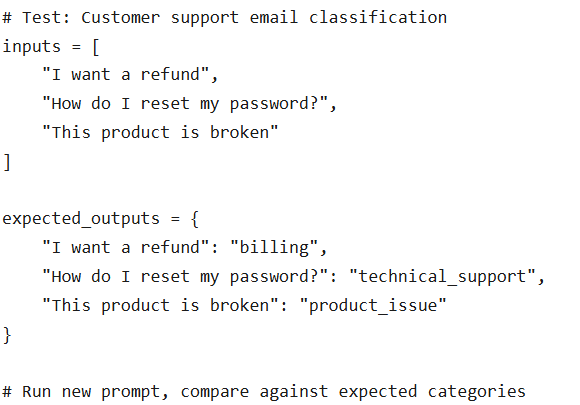
1. Golden Dataset Testing
Run prompt revisions against known input-output pairs. Example:
2. Probabilistic Output Diffing
Since outputs vary across runs, compare structural and semantic elements instead of raw text.
A logistics company we work with uses semantic similarity scoring. Their prompt generates shipping descriptions. They don’t check for exact matches—they check that the new outputs are 90%+ semantically similar to the golden outputs using embedding distance.
3. Style and Constraint Adherence Tests
Verify the model honors format, tone, and constraints:
Is the output valid JSON?
Is it under the 200-word limit?
Does it maintain professional tone?
Does it avoid prohibited terms?
4. Toxicity and Bias Tests
Run automated classifiers for risk detection. Tools like Perspective API or custom classifiers can flag:
Toxic language
Demographic bias
Potentially offensive content
Real impact: A media company added toxicity tests to their content summarization prompts. In the first month, the tests caught three prompt variations that occasionally generated slightly inflammatory summaries. None would have been caught by human review because they only appeared 2-3% of the time.
Rollback Procedures: Your Escape Hatch
Prompt failures often require urgent rollback. Friday at 4 PM, something breaks, and you need to revert. Fast.
A mature PromptOps setup supports:
Version pinning:
service: customer-support-classifier
prompt_version: 2.3.1 # Pin to specific version
model: gpt-4-turbo
fallback_prompt_version: 2.2.0 # Auto-rollback target
Model → prompt compatibility mapping:
Know which prompts work with which models. We’ve seen teams update from GPT-4 to GPT-4-turbo and break half their prompts because behavior changed slightly.
Instant reversion to last stable version:
One command: promptops rollback customer-support-classifier –to-version 2.2.0
Rollback impact analysis:
Before rolling back, see: “This will affect 12 endpoints, 3 customer-facing features, used by ~50K requests/day.”
This reduces Mean Time to Recovery (MTTR) from hours to minutes. One client went from 4-hour MTTR to 8-minute MTTR after implementing proper rollback procedures.
00
4. The Anatomy of a Production-Ready Prompt
Not all prompts are created equal. A production-ready prompt isn’t just “text that works.” It’s a structured, documented, tested asset.
The Four Essential Components
1. Context
Sets the stage. Defines:
System goals (“You are a financial advisor assistant…”)
Domain rules (“Always cite SEC regulations when discussing compliance…”)
User attributes (“The user is a healthcare professional…”)
Constraints on external knowledge (“Only use information from the provided documents…”)
2. Instruction
Clear, deterministic guidance:
What to do (“Summarize the following in 3 bullet points…”)
What NOT to do (“Do not make assumptions about missing data…”)
How to reason (“First identify the main topic, then…”)
How to respond (“If uncertain, say ‘I don’t have enough information’…”)
3. Constraints
Explicit boundaries:
Tone (“Professional but friendly…”)
Token length (“Limit response to 150 words…”)
Safety requirements (“Never generate medical advice…”)
Formatting instructions (“Use markdown with headers…”)
Compliance rules (“Do not reveal PII…”)
4. Output Format
Machine-parseable, validated structure:
{
“classification”: “string”,
“confidence”: “float”,
“reasoning”: “string”,
“flagged_concerns”: [“array”]
}
Not “just return JSON.” Give the exact schema. Validate against it.
Metadata: The Ops Layer
A production prompt needs metadata that answers:
Use case: What is this for? (one sentence)
Owner: Who’s responsible? (Slack handle or email)
SLA: What’s acceptable latency/cost? (e.g., <2s, <$0.05 per call)
Model version: Which model(s) is this tested with?
Last updated: When was this changed? By whom?
Evaluation score: What’s baseline accuracy? (e.g., 92% on golden dataset)
Risk level: Low/Medium/High (determines approval workflow)
Dependencies: What other systems depend on this output?
Documentation: Save Future You From Present You
Every prompt needs documentation that specifies:
When to use: “Use this prompt when classifying customer support emails that mention billing issues.”
When NOT to use:“Do not use for technical support issues—use the tech-support-classifier prompt instead.”
Known failure modes:“Occasionally misclassifies refund requests as cancellations when both terms appear in the same email.”
Required inputs:“Requires: email_body (string, max 5000 chars), customer_tier (enum: free/pro/enterprise)”
Downstream dependency cautions:“Output is consumed by billing-workflow-orchestrator. Changes to JSON schema require coordination.”
This documentation layer is critical. Without it, every new engineer spends a week reverse-engineering what prompts do and why they exist. With it, onboarding time drops from days to hours.
00
5. Governance Without Bureaucracy: The Risk-Tiered Approach
The moment governance becomes bureaucratic, engineers bypass it. They’ll start maintaining shadow prompts in local files, defeating the entire purpose.
The solution? Risk-tiered approval workflows that match the actual business impact.
Approval Workflows: Not All Prompts Are Equal
Low-Risk Prompts (UI enhancements, internal summarization, non-customer-facing)
Auto-approval after automated tests pass
No human review unless tests fail
Example: Internal meeting summarizer
Medium-Risk Prompts (customer-facing copy, classification tasks)
One senior engineer review required
Automated bias/toxicity checks must pass
Semantic diff review (reviewer sees before/after outputs)
Example: Product recommendation descriptions
High-Risk Prompts (financial, healthcare, legal decisions)
Multi-stage approval (engineer + domain expert + compliance officer)
Full regression test suite required
Canary deployment mandatory
Rollback plan documented before approval
Example: Medical document classification for insurance claims
Real implementation: A fintech company routes prompts based on tags:
risk:low → auto-merge after tests
risk:medium → one approval + 24hr soak test
risk:high → three approvals + phased rollout over 2 weeks
Low-risk changes deploy in minutes. High-risk changes take days. Everyone understands why.
Automated Quality Checks: Let Machines Do the Boring Stuff
Reduce governance burden with automated checks that run on every prompt change:
Pre-merge checks:
Toxicity classification (using Perspective API or similar)
Bias heuristics (demographic term scanning)
Constraint adherence (JSON schema validation, length checks)
Output structure validation (does it match expected format?)
Latency benchmarking (test on sample inputs, flag if >2x slower)
Cost estimation (tokens used × model cost)
Post-deploy checks:
Real-time performance monitoring
Output quality scoring
User feedback correlation
Error rate tracking
A healthcare client runs 14 automated checks on every prompt change. Only 3% of changes require human intervention beyond the standard review. The other 97% get validated automatically.
Performance Monitoring: Know When Prompts Start Failing
Prompt monitoring isn’t optional. You need dashboards tracking:
Core metrics:
Accuracy (against golden dataset)
Latency (p50, p95, p99)
Cost ($ per invocation)
Drift (output distribution changes over time)
Failure modes (parsing errors, refusals, hallucinations)
Escalation rate (how often do outputs trigger human review?)
Alert thresholds:
Accuracy drops >5% → page on-call
Latency exceeds 2x baseline → investigate
Cost spikes 3x → circuit breaker
Drift detected → schedule review
We helped a SaaS company set up prompt monitoring that correlates prompt versions with customer support ticket rates. They discovered that a “perfectly tested” prompt was generating slightly confusing outputs that increased support tickets by 8%. No functional failure—just a subtle UX degradation their tests missed.
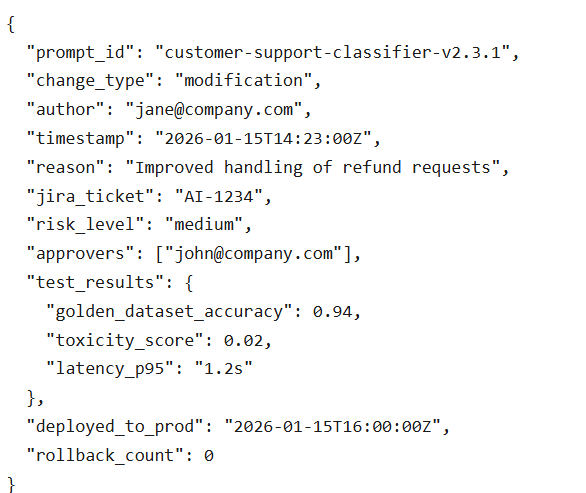
Audit Trails: Because Compliance Teams Ask
For regulated industries, audit logs are non-negotiable. But even non-regulated companies benefit from knowing:
What audit logs include:
Who changed what (user ID, timestamp)
Why (PR description, Jira ticket)
What changed (full diff, before/after examples)
Risk level and approval chain
Results of all evaluation tests
Production deployment details
Rollback history
Format:
This level of detail sounds excessive until your compliance officer asks, “Can you prove this prompt has never generated biased outputs?” And you can show them the audit trail.
6. Case Study: PromptOps at Scale
Let’s talk about a global e-commerce platform that went from 25 to 200+ production prompts in under six months. They’re now processing 50M+ LLM calls per day.
Their Challenges (Sound Familiar?)
Before PromptOps:
Who changed what (user ID, Prompt changes creating UX inconsistencies across search, recommendations, and support
No way to track which model version used which prompt version
Growing incident rate—prompt-related issues up 300% quarter-over-quarter
No test infrastructure (engineers just “tried stuff” in prod)
Debugging took days because nobody knew what prompt was running where
New engineers afraid to touch prompts (rightly so)
What They Implemented (4-Month Timeline)
Month 1: Foundation
Centralized prompt registry with metadata
Git-based versioning
Owner assignment for every prompt
Risk-level tagging
Month 2: Testing
Created golden datasets (10-50 examples per prompt)
Automated regression tests
Prompt linting rules
Basic hallucination checks
Month 3: Deployment
Canary deployments for high-impact prompts
Prompt diff visualizer for reviewers
Performance dashboards per prompt
Rollback procedures documented
Month 4: Advanced
Drift detection (alerts when outputs change pattern)
Auto-rollback on quality drops
Full audit trail implementation
Integration with incident management
The ROI (Numbers That Made Leadership Pay Attention)
Incident reduction:
40% fewer prompt-related incidents
85% of remaining incidents caught in canary phase
Debugging speed:
From avg 6 hours to 1 hour (60% improvement)
MTTR from 4.2 hours to 0.8 hours
Deployment velocity:
Time-to-ship new prompt versions: 3 days → 4 hours (30% improvement)
Engineer confidence: 67% “afraid to change prompts” → 91% “confident in prompt changes”
Consistency gains:
Search, recommendations, and support automation now use versioned, tested prompts
Customer experience metrics improved across the board (NPS +8 points)
Cross-team collaboration improved (teams can safely reuse each other’s prompts)
Cost savings:
Reduced wasted LLM calls from buggy prompts (saved ~$45K/month in API costs)
Reduced engineering time spent debugging prompt issues (saved ~240 engineer-hours/month)
This is the operational maturity mid-market organizations must adopt to scale safely. Not because it’s elegant—because it prevents expensive, embarrassing production failures.
7. Building Your PromptOps Practice: A 4-Month Roadmap
You don’t need to reach Level 4 overnight. Here’s a realistic, pragmatic roadmap we’ve implemented with dozens of clients.
Month 1: Inventory and Centralize
Week 1-2: Build prompt inventory
Hunt down every prompt in your systems (yes, including the ones in Slack threads)
Document: what it does, where it’s used, who owns it
Estimate usage (requests/day) and impact (customer-facing? revenue-affecting?)
Week 3: Tag risk levels
Low: internal tools, non-customer-facing
Medium: customer-facing but not business-critical
High: financial, legal, healthcare, or compliance-related
Week 4: Establish registry
Create centralized location (Git repo, wiki, or dedicated tool)
Migrate all prompts with metadata
Announce to team: “This is now the source of truth”
Success metric: 100% of production prompts documented and accessible in one place
Month 2: Version Control + Basic Testing
Week 1: Move prompts to Git
Set up prompt repository
Add metadata files (YAML or JSON) alongside prompts
Create branching strategy (main = prod, staging = testing)
Week 2-3: Create golden datasets
For each prompt, collect 10-50 real examples
Document expected outputs
This is tedious but critical—don’t skip it
Week 4: Implement automated tests
Output format validation
Basic regression tests against golden datasets
Hook into CI/CD
Success metric: All prompts in version control with at least basic test coverage
Month 3: Review Process + Monitoring
Week 1-2: Create prompt review workflow
Write PR template with review checklist
Assign prompt reviewers per domain
Document approval process for each risk tier
Week 3: Implement performance dashboards
Accuracy metrics per prompt
Latency tracking
Cost monitoring
Error rates
Week 4: Add semantic diffing
Tool that shows reviewers: “Here’s what the outputs look like with the new prompt”
Establish rollback procedures
Success metric: All prompt changes go through review; all prompts have monitoring
Month 4: Full CI/CD + Drift Detection
Week 1: Linting rules
Automated checks for common mistakes
Style consistency
Length limits
Week 2: Full regression suite
Expand golden datasets
Add property-based tests
Toxicity/bias checks
Week 3: Canary deployments
Roll out high-risk changes to 5% of traffic first
Automated quality monitoring during canary
Auto-rollback if quality drops
Week 4: Drift detection
Alert when outputs change pattern (could indicate model update or data shift)
Implement approval workflows
Document everything
Success metric: Prompt changes are as safe and controlled as code deployments
Timeline Expectations
By end of Month 1: You know what you have
By end of Month 2: You have version control and basic safety
By end of Month 3: You have review processes and visibility
By end of Month 4: You have full lifecycle management
Most organizations reach Level 3 by Month 4, with pieces of Level 4. That’s enough to dramatically reduce incidents and increase velocity.
00
8. Tools and Technologies: What to Use
You don’t need to build everything from scratch. Here’s what’s available.
Prompt Management Platforms
Humanloop
Good for: Teams with 10-100 prompts
Strengths: User-friendly, fast setup, built-in testing
Limitations: Can get expensive at scale
PromptLayer
Good for: Teams prioritizing observability
Strengths: Excellent tracking and logging
Limitations: Less mature testing framework
Weights & Biases Prompt Tools
Good for: Teams already using W&B for ML
Strengths: Integrates with existing workflows
Limitations: Requires W&B familiarity
Testing Frameworks
DeepEval
Comprehensive evaluation framework
Great for: Hallucination detection, bias testing, custom metrics
OpenAI Evals
Open-source evaluation framework
Great for: Teams using OpenAI models
Ragas
RAG-specific evaluation
Great for: If you’re building RAG systems
Monitoring Solutions
Arize AI
Full-stack LLM monitoring
Great for: Enterprise deployments
WhyLabs
Data quality + LLM monitoring
Great for: Teams concerned with drift
Custom Prometheus/Grafana
Great for: Teams with existing observability stack
More work to set up but fully customizable
DevOps Integrations
Whatever you choose, it needs to integrate with:
GitHub Actions / GitLab CI / Jenkins (for CI/CD)
Datadog / New Relic / Splunk (for monitoring)
PagerDuty / Opsgenie (for alerting)
Jira / Linear (for incident tracking)
00
9. Prompts Are Code—Treat Them That Way
Here’s what we tell every engineering leader we work with:
Prompts are not creative text. They’re deterministic production assets that require engineering discipline.
The organizations that figure this out early have a massive competitive advantage. While their competitors are still treating prompts as “config files that sometimes break,” they’re deploying AI systems with the same reliability and velocity as the rest of their infrastructure.
What You Gain
Faster AI deployment: Prompt changes that used to take days now take hours. Teams stop being afraid to iterate.
Lower incident rates: Catch regressions in testing instead of production. One client went from 15 prompt-related incidents per quarter to 2.
Better compliance posture: Audit trails, approval workflows, and version control make compliance teams happy (and keep you out of legal trouble).
Higher engineering confidence: When engineers trust the prompt deployment process, they ship faster and experiment more freely.
Tangible ROI: Measured in reduced rework, prevented incidents, and accelerated innovation. One client calculated $280K in annual savings just from reduced debugging time.
The Alternative
Without PromptOps? You’re gambling. Every prompt change is a roll of the dice. Sometimes it works. Sometimes it breaks production. You won’t know which until customers tell you.
And in 2026, with AI systems handling everything from customer support to financial transactions, “we’ll find out in production” is not an acceptable strategy.
00
How V2Solutions Helps
We’ve implemented PromptOps across 40+ organizations—from scrappy mid-market companies to Fortune 500 enterprises. We know what works, what’s overkill, and what’s worth the investment.
We help teams:
Audit existing prompt chaos and build actionable improvement roadmaps
Implement version control, testing, and monitoring infrastructure
Design risk-tiered governance that doesn’t slow teams down
Train engineers on prompt engineering and PromptOps best practices
Build custom tooling when off-the-shelf solutions don’t fit
No consulting theater. No six-month “transformation programs” that produce PowerPoints instead of working systems. Just pragmatic, production-ready PromptOps that ships in weeks, not quarters.
If your team is shipping prompts to production without version control, if debugging prompt failures takes days, if compliance is asking questions you can’t answer—let’s fix it.
Because the cost of not having PromptOps isn’t just inefficiency. It’s the million-dollar incident you’ll spend two weeks debugging at 2 AM.
The Cost of Not Having PromptOps Isn't Just Inefficiency.
It’s the million-dollar incident you’ll spend two weeks debugging at 2 AM. Fix your prompt chaos today with production-ready PromptOps.
Author’s Profile

Dipal Patel
VP Marketing & Research, V2Solutions Dipal Patel is a strategist and innovator at the intersection of AI, requirement engineering, and business growth. With two decades of global experience spanning product strategy, business analysis, and marketing leadership, he has pioneered agentic AI applications and custom GPT solutions that transform how businesses capture requirements and scale operations. Currently serving as VP of Marketing & Research at V2Solutions, Dipal specializes in blending competitive intelligence with automation to accelerate revenue growth. He is passionate about shaping the future of AI-enabled business practices and has also authored two fiction books.